

Creator · Open-source desktop application · Tauri · Rust · TypeScript
r0 — AI-Powered Desktop Code Editor
r0 is a cross-platform development workbench that combines code editing, AI agents, terminal sessions, source control, databases, debugging, and project tools. Its TypeScript workbench runs inside a native Tauri and Rust application, with separate Rust crates for major capabilities.
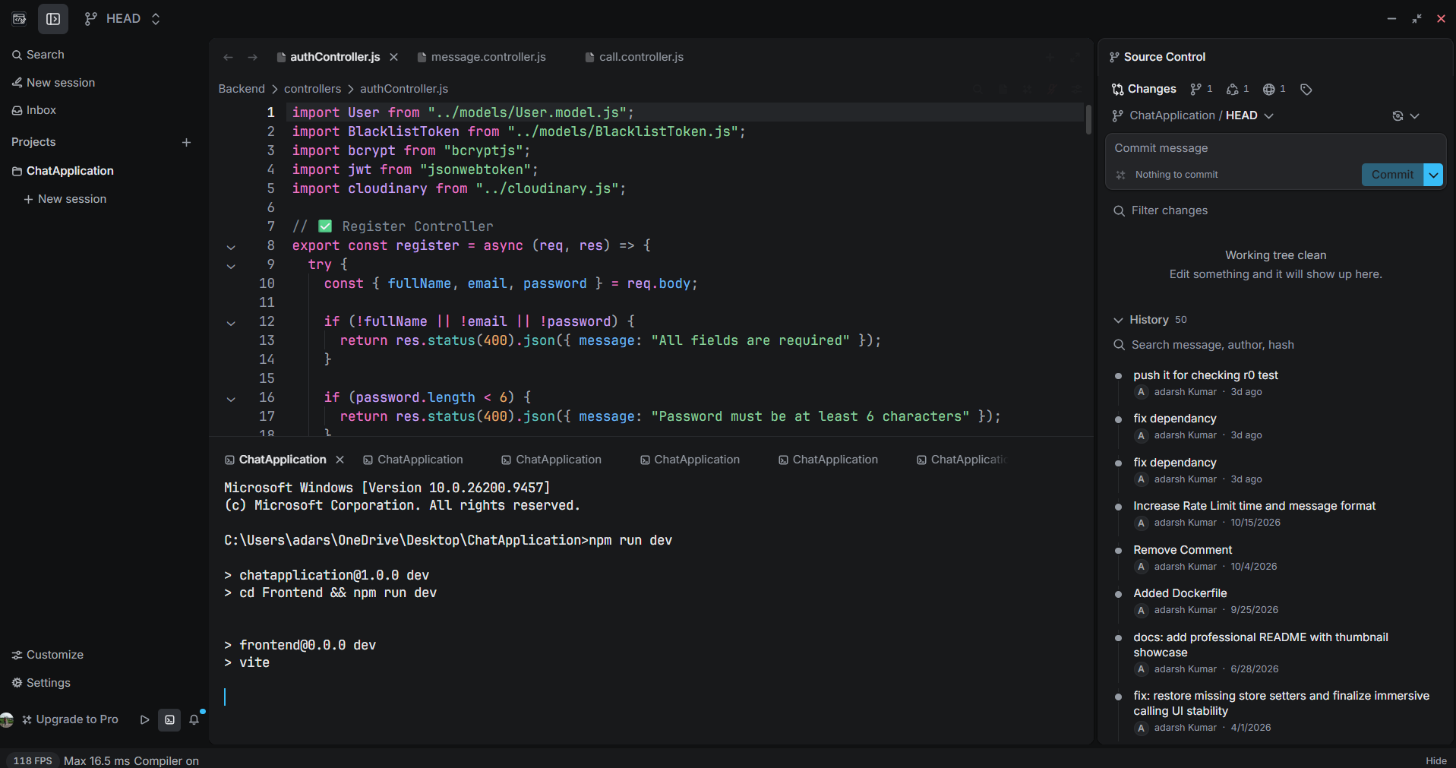
Overview
r0 is a cross-platform development workbench that combines code editing, AI agents, terminal sessions, source control, databases, debugging, and project tools. Its TypeScript workbench runs inside a native Tauri and Rust application, with separate Rust crates for major capabilities.
System architecture
A high-level view of the components and boundaries described by the project source and documentation.
User and data flow
Choose a workspace so the explorer, search, editor, and tools can work with its project context.
Navigate files, symbols, diagnostics, history, and references with editor and language-tool support.
Run project commands in terminal sessions and use supported Git, debugging, database, or preview tools.
Use the configured AI workflow and provider to explore a task, prepare a plan, or carry out supported actions.
Inspect proposed edits and permission prompts, then accept, reject, or continue with the appropriate development workflow.
Product capabilities
01 · Editing and code intelligence
- CodeMirror 6 editing with syntax support, formatting and lint integrations, diagnostics, language-server features, and Vim mode.
- Multiple files, tabs, split panes, workspace layouts, symbol/reference navigation, local file history, and supported document previews.
- Project explorer, Quick Open, command palette, keyboard shortcuts, and workspace-wide search for navigating larger projects.
02 · AI assistance and agents
- Ask for explanations, plan a change before editing, or use Agent workflows for supported multi-step development tasks.
- Connect configured model providers and agent integrations; the repository describes support for 17+ providers and workflows of up to 24 tool-use steps.
- Use project context, inline assistance, session management, edit review, and approval-gated access to supported tools.
- Continuous, detached, cloud, or ACP agent capabilities depend on the selected integration, release, credentials, and workspace setup.
03 · Build, debug, and data tools
- Integrated terminal sessions for running the commands already defined by a project; terminal processes use the native application layer.
- Source control for repository status, diffs, branches, commits, and GitHub repositories, pull requests, issues, and Actions.
- Supported language-server and debugging-adapter connections, database browsing and queries, and project/browser previews.
- Remote workspace, WSL, and Docker workflows are available where platform support and project configuration permit.
04 · Extensibility and customization
- Install language and editor integrations, extensions, and icon themes to adapt the workbench to a project.
- Customize themes, keybindings, editor settings, file icons, sidebars, panes, and workspace layout.
- Collaboration, sharing, remote workspaces, and managed policies depend on the configured deployment and organization.
05 · Privacy, permissions, and recovery
- Approval-gated actions and configurable permissions keep agent execution reviewable and under developer control.
- API-key handling integrates with native OS keyring facilities; protect provider credentials and workspace data according to the provider and organization policies.
- Local-first operation, session recovery, and zero telemetry are project priorities; using remote providers, cloud agents, or collaboration services necessarily depends on those services.
Data model and domain
TypeScript frontend ↔ native application boundary
The desktop UI calls native functionality through Tauri's command and event boundary. Generated bindings connect the TypeScript workbench to Rust, while capability-focused crates keep platform and tool integrations separated.
Workspace and integration domains
A project workspace coordinates local files and optional development integrations. Provider credentials, installed tools, OS support, and organization policy determine which workflows are available.
Startup, persistence, and performance
r0 is a native desktop workbench, so its responsiveness depends on startup work, workspace size, language servers, extensions, and active AI or development tools. The repository documents phased startup and deferred loading; it does not claim a fixed RAM, CPU, or end-to-end latency benchmark.
Phased startup
The TypeScript application entry point lazy-loads the main workbench and detached agent/resource surfaces behind a lightweight initial shell, allowing the first UI frame before all large surfaces are loaded.
Background work
The project documents delayed extension-catalog checks that avoid overlapping requests and pause while the application window is hidden.
Local recovery
Session recovery and local-first workflows help resume development; API providers, cloud agents, collaboration, and remote workspaces are separate integrations with their own network and credential requirements.
Measure real workloads
Resource use varies with the complete process group, workspace size, open documents, language servers, extensions, and AI activity. Compare production builds at idle, after workspace load, and during representative work rather than relying on a single process row.
Implementation notes and current limits
These details were checked against the repository code as well as its README, so the design goals are not confused with behavior that is already implemented.
- Provider, model, and agent actions require the corresponding credentials and integration; provider availability and tool capabilities can vary by release.
- Language-server, debugger, database, browser-preview, Docker, WSL, remote, and collaboration capabilities require their related tools, extensions, platform support, or managed configuration.
- The repository does not publish a universal RAM or CPU guarantee. Measure the full production process group with a representative workspace and enabled integrations.
- Local-first and zero-telemetry product priorities do not mean every workflow is offline: external model providers, cloud agents, collaboration, and remote workspaces involve their configured services.
Engineering decisions
Capability-oriented Rust workspace
The Cargo workspace splits native responsibilities into crates for projects, AI, terminal, LSP, remote and WSL, Git/GitHub, databases, browser, Docker, debugging, and extensions.
Explicit frontend/native contract
Tauri commands and generated TypeScript bindings provide a defined interface between the workbench and native Rust functionality.
Permission-aware agent workflows
AI features are configured around providers, models, available integrations, and permissions; approval prompts make tool execution reviewable.
Cross-platform boundary
Tauri and Rust host OS-specific integrations while the TypeScript workbench presents a shared interface. Availability can vary across Windows, macOS, Linux, and workspace type.
Lazy loading and background scheduling
The UI defers loading of large workbench surfaces and schedules selected background work after startup, reducing unnecessary startup contention without promising a fixed performance number.
Configurable integration model
AI providers, language tools, database connectors, and extensions are configurable integrations rather than a single fixed environment; feature behavior follows the installed version and configuration.
Setup and delivery
- Stable installers are published on GitHub Releases for Windows x64 and ARM64, Linux x64 and ARM64, and macOS Intel and Apple silicon.
- r0 checks for updates after startup and periodically; users can also check for updates manually in Settings.
- The repository documents building from source with Node.js 24, Bun 1.3.14, and Rust; the product website contains user guides for AI, editing, Git, terminal workflows, databases, extensions, and collaboration.
- Exact installer formats, integrations, and supported features depend on the target OS and release. Review the current release notes and documentation before installing or configuring integrations.
Technology
Explore the project
Open the project links above to review its source, documentation, or available deployment.